

Click Here to Download the PDF.
The Biggest AI Mistake Isn't Using the Wrong Tool. It's Using Too Many.
AI has never been more accessible.
Every week, dozens of new tools appear.
Each promises to help you write faster.
Design better.
Create videos.
Research smarter.
Automate your business.
Generate images.
Build products.
It's exciting.
It's also exhausting.
Many people don't have an AI problem.
They have a decision problem.
They spend more time comparing tools than using them.
Bookmarks pile up.
Browser tabs multiply.
YouTube reviews fill entire weekends.
Nothing actually gets built.
The people getting the biggest results with AI aren't necessarily using the most tools.
They're using the fewest tools that solve the most important problems.
That's the difference.
A great workflow beats a giant toolbox every time.
Instead of asking:
"What new AI tool should I learn?"
Start asking:
"What is the biggest bottleneck in my workflow today?"
The answer usually points directly to the right tool.
AI Doesn't Replace Thinking. It Removes Friction.
One of the biggest misconceptions about AI is that it replaces creativity.
It doesn't.
It removes friction between your ideas and execution.
Think about the creative process.
An idea appears.
You need to research.
Write.
Edit.
Design.
Record.
Publish.
Promote.
Sell.
Each step creates resistance.
AI reduces that resistance.
The goal isn't to automate your thinking.
It's to automate the repetitive work so you have more energy for thinking.
The best AI users aren't outsourcing creativity.
They're protecting it.
Start With Workflows, Not Tools
Most people build their workflow like this:
"I found a cool tool."
"I wonder where I can use it."
Successful creators do the opposite.
They identify the problem first.
Then choose the tool.
For example:
Need to write?
Choose a writing assistant.
Need to research?
Choose a research assistant.
Need to edit video?
Choose a video editor.
Need to launch a product?
Choose a platform designed for selling.
The sequence matters.
Problems first.
Tools second.
The 20 Free AI Tools Worth Knowing in 2026
Below are some of the most practical AI tools available today and the problems they solve.
Remember:
You don't need all of them.
You need the right ones.
1. ChatGPT
Best for
Writing
Brainstorming
Summarizing
Planning
Explaining complex topics
Why it's useful
ChatGPT helps transform rough thoughts into structured drafts, outlines, emails, articles, lesson plans, marketing copy, and much more.
Instead of staring at a blank page, you start with momentum.
Try this
Paste your rough notes and ask:
"Turn these into a clear first draft."
2. Canva Magic Design
Best for
Social media graphics
Presentations
Marketing visuals
Why it's useful
Instead of starting with an empty design, AI generates polished layouts based on your content.
Try this
Upload your text first.
Then let AI build the visual.
3. CapCut
Best for
Short-form video editing
TikTok
Instagram Reels
YouTube Shorts
Why it's useful
Fast editing without professional software.
Automatic captions.
Templates.
Transitions.
Effects.
Try this
Create one short educational video every week.
Consistency matters more than perfection.
4. OpusClip
Best for
Repurposing long-form content
Why it's useful
Instead of manually finding highlights, AI identifies engaging clips automatically.
One long video becomes multiple pieces of content.
Try this
Upload a webinar or podcast and generate several social clips.
5. Descript
Best for
Podcast editing
Video editing
Voice editing
Why it's useful
Edit audio by editing text.
Delete a sentence.
The audio updates automatically.
It dramatically simplifies editing.
6. Notion AI
Best for
Organizing ideas
Meeting notes
Knowledge management
Why it's useful
Helps summarize documents, organize projects, brainstorm ideas, and rewrite notes.
Excellent for creators managing multiple projects.
7. Perplexity
Best for
Research
Fact-checking
Finding sources
Why it's useful
Unlike traditional search engines, Perplexity provides summarized answers with citations.
It's particularly useful when researching unfamiliar topics.
8. Bing Image Creator
Best for
Generating AI images
Illustrations
Concept art
Why it's useful
Quickly creates custom visuals without hiring an illustrator.
Perfect for blog images, presentations, or brainstorming concepts.
9. Fellow
Best for
Meetings
Agendas
Team collaboration
Why it's useful
Keeps meetings organized before, during, and after they happen.
Captures action items automatically.
10. Pika
Best for
Image-to-video generation
Why it's useful
Bring static visuals to life with simple animations.
Great for marketing content and social media.
11. Leonardo AI
Best for
High-quality illustrations
Game assets
Marketing visuals
Why it's useful
Produces clean, professional-looking AI artwork with strong customization options.
12. Recraft AI
Best for
Logos
Icons
Vector graphics
Why it's useful
Creates scalable graphics suitable for branding and design work.
Especially valuable for startups and creators.
13. Runway Gen-2
Best for
Text-to-video generation
Creative storytelling
Why it's useful
Transforms written prompts into video sequences, making video production dramatically faster.
14. ElevenLabs
Best for
AI voiceovers
Narration
Audiobooks
Why it's useful
Produces realistic speech in multiple languages and tones.
Useful for videos, podcasts, and accessibility.
15. Munch
Best for
Automatically creating social media clips
Why it's useful
AI identifies engaging moments and formats them for multiple platforms.
16. Pixlr AI
Best for
Quick photo editing
Background removal
Image cleanup
Why it's useful
Professional-looking edits directly in your browser without expensive software.
17. HeyGen
Best for
AI avatars
Training videos
Explainer videos
Why it's useful
Allows creators to produce presenter-style videos without constant filming.
18. Luma Dream Machine
Best for
AI-generated videos from text
Why it's useful
Excellent for quickly visualizing ideas or creating cinematic sequences.
19. GrammarlyGO
Best for
Editing
Grammar
Tone improvement
Why it's useful
Improves clarity while preserving your writing style.
Helpful for emails, proposals, and articles.
20. creatyl
Best for
Building and selling digital products
Courses
Downloads
Communities
Memberships
Why it's useful
Knowing something valuable isn't enough.
People need a way to package, organize, publish, and sell what they know.
creatyl simplifies that process by bringing products, offers, files, and communities into one platform so creators can focus more on teaching and less on technology.
The Biggest Productivity Upgrade Comes From Connecting Tools Together
Individual AI tools are helpful.
Workflows are transformational.
For example:
Research in Perplexity.
Draft inside ChatGPT.
Refine inside GrammarlyGO.
Design in Canva.
Create video in CapCut.
Repurpose with OpusClip.
Publish your digital product in creatyl.
One output naturally becomes the next input.
Instead of starting over every time, your work compounds.
For example…
Marcus wanted to launch his first online course.
Every task felt overwhelming.
Writing.
Slides.
Graphics.
Sales page.
Video.
He spent weeks jumping between browser tabs.
Nothing was finished.
He believed he needed better ideas.
The real issue was fragmented execution.
Each step required learning another tool.
Each tool introduced more complexity.
Eventually he stopped making progress altogether.
Marcus simplified his workflow.
Perplexity for research.
ChatGPT for writing.
Canva for visuals.
CapCut for editing.
creatyl to publish and sell.
Instead of managing twenty disconnected tools, he built one connected process.
The course launched.
Not because he found perfect software.
Because he removed unnecessary decisions.
Common AI Mistakes
Avoid these traps:
Collecting tools instead of building systems
Knowledge without execution changes nothing.
Switching tools constantly
Master one workflow before exploring another.
Automating bad processes
AI accelerates existing systems.
Improve the workflow first.
Expecting AI to replace expertise
AI amplifies knowledge.
It doesn't replace it.
Your judgment remains your biggest advantage.
Waiting for the "perfect" AI tool
No tool is perfect.
Progress comes from consistent use, not endless comparison.
How to Build Your Own AI Workflow
Start small.
Choose one recurring task.
Examples:
Writing newsletters.
Editing videos.
Creating presentations.
Researching competitors.
Organizing meetings.
Now ask:
"What takes the longest?"
Find one AI tool that solves that problem.
Use it consistently for two weeks.
Measure the time saved.
Only then add another tool.
Layer improvements gradually.
That's how sustainable systems are built.
Weekly AI Challenge
This week:
Choose one repetitive task.
Use one AI tool to simplify it.
Track:
- Minutes saved
- Better quality
- Less frustration
- Faster completion
Don't judge the tool after one attempt.
Judge it after ten.
Consistency reveals value.
Resources to Continue Learning AI
Book
Co-Intelligence by Ethan Mollick
A practical guide to working alongside AI rather than competing against it.
Newsletter
Ben's Bites
A daily summary of practical AI developments without overwhelming technical detail.
Podcast
Practical AI
Excellent for learning how businesses and creators are applying AI in real-world situations.
AI Doesn't Reward People Who Know the Most Tools
It rewards people who remove the most friction.
The creator who consistently publishes every week will outperform the creator who spends six months researching software.
The entrepreneur who launches with five dependable tools often moves faster than someone experimenting with fifty.
Technology changes constantly.
Workflows last much longer.
Don't chase every new platform.
Build a repeatable system.
Protect your time.
Reduce unnecessary decisions.
Let AI handle repetitive work.
Keep your attention focused on solving meaningful problems.
Because AI will never replace your experience.
It will simply help more people benefit from it.
And sometimes, that's all the advantage you need.
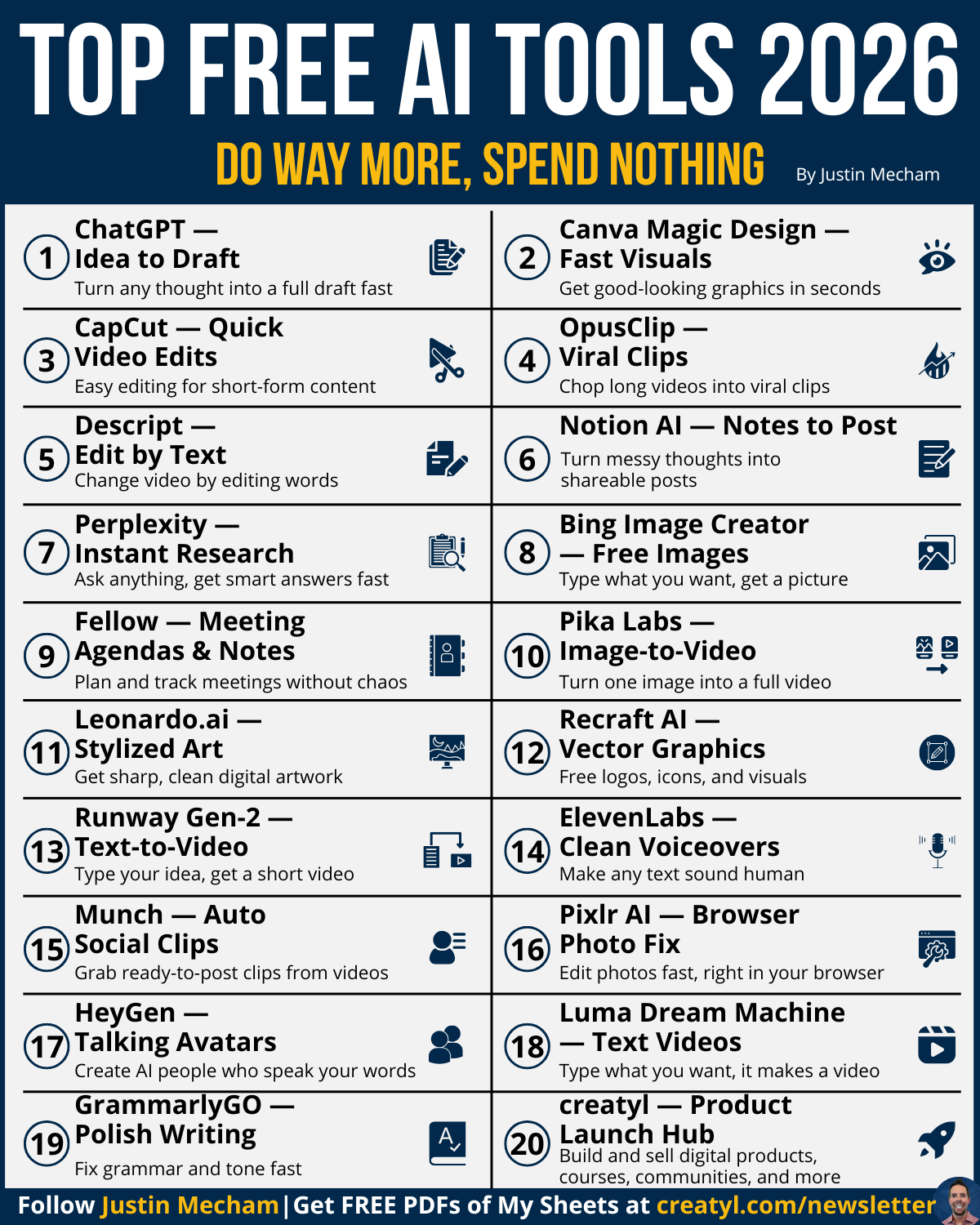
Download the Related Infographic
Want a simple reference you can keep beside your desk?
Download the Top Free AI Tools 2026 infographic. It highlights 20 practical AI tools, explains what each one does best, and helps you quickly match the right tool to the right task. Whether you're writing, researching, designing, editing videos, or building digital products, this guide can help you spend less time searching and more time creating.